 Keyboard shortcuts are available now, shortcut list down below! Support the channel and check out the videos!
Keyboard shortcuts are available now, shortcut list down below! Support the channel and check out the videos!
Keyboard shortcuts are available now, shortcut list down below! Support the channel and check out the videos!


Boost your productivity with our customizable Pomodoro timer, cute themes, and focus ambience.
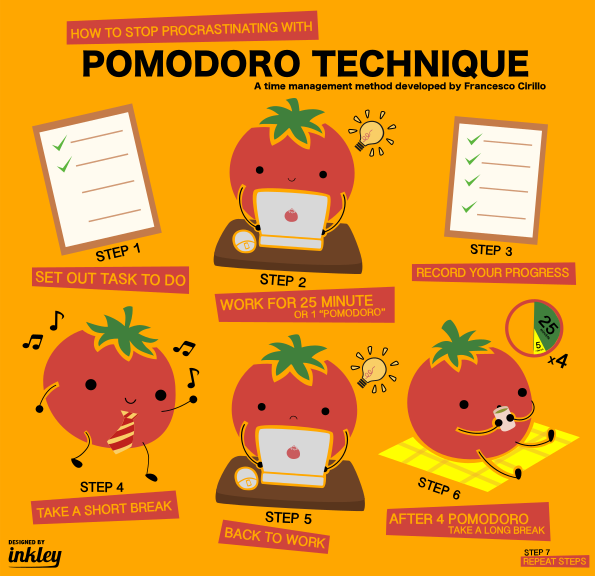
The Pomodoro workflow at a glance — pick a task, focus for 25 minutes, break for 5, repeat.
The Pomodoro Technique is a time management method developed by Francesco Cirillo in the late 1980s. It uses a timer to break work into focused intervals — traditionally 25 minutes — separated by short breaks. Our free online Pomodoro timer makes it easy to implement this technique with customizable intervals, cute themes, and soothing lofi ambience sounds.
⌨️ Keyboard shortcuts: Space — play / pause the timer, → — skip to the next phase.
Not everyone works best in 25-minute blocks. Our custom Pomodoro timer lets you set your own work and break durations. Click the Custom Timer button to adjust intervals and even assign unique ambience presets to each mode.
Study sessions don't have to be boring. TomatoTimers is an aesthetic Pomodoro timer with adorable visuals, seasonal videos, and a cozy design that makes focusing feel fun. Switch between the Classic Tomato theme and our popular Duck theme.
Need help tuning out distractions? Use our focus timer with built-in lofi ambience. Choose from Rainy Focus, Cozy Cafe, Campfire Night, Ocean Breeze, or Customize your own ambience using the Ambience Studio — each designed to help you enter deep work without lyrics or distracting music.
Yes! TomatoTimers is a free Pomodoro timer with no hidden fees, no premium tier, and no sign-up required. All features — including custom intervals, task manager, and ambience — are available instantly.
Absolutely. Thousands of students use TomatoTimers as their daily study timer. The Pomodoro method is proven to boost focus, reduce procrastination, and improve information retention during long study sessions.
Unlike plain countdown apps, TomatoTimers is designed to be a cute Pomodoro timer with charming visuals, animated themes, and a warm color palette. It turns productivity into a pleasant experience rather than a chore.
Click the Custom Timer button to open the settings modal. From there, you can adjust the Pomodoro, Short Break, and Long Break durations. You can also assign ambience presets to each mode so your focus sounds automatically switch as you move between work and rest.
Yes, our online Pomodoro timer is fully responsive and works perfectly on iPhone, Android, and tablets. Use it in your browser — no app download required.

Work 52 focused minutes, then take 17 to truly unplug — the deep-work rhythm measured from the most productive people.

Every 20 minutes, look 20 feet away for 20 seconds — a gentle eye-break rhythm that fights digital eye strain.

Work as long as you're in flow while your break charges in real time — earn rest sized to the work you actually did.

Stack, name and loop your own phases — a timer you assemble from scratch for study, workouts or intervals, saved right in your browser.

Live countdown to the deadlines that matter — exams, launches, holidays — with icons, colors and a pin that rides along on your timer pages.

A daily habit tracker that draws your streaks on one big calendar — check in every day, keep the run alive, and pin your favorite streak to any timer page.
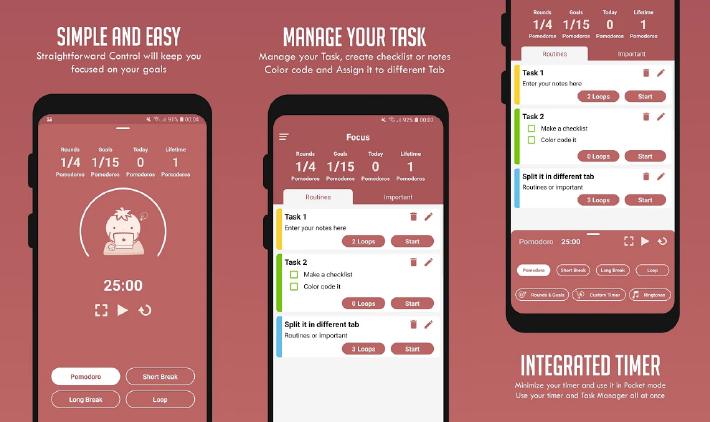




TomatoTimers is a customizable and easy to use looping pomodoro timer to boost your efficiency.
Pomodoro™ Technique is a time management method developed by Francesco Cirillo in the late 1980s. This technique use timer to break down works into a set of intervals separated by breaks. Pomodoro technique increases productivity by taking short scheduled breaks regularly.
USE THE LOOP BUTTON TO DO STEP 1 UNTIL STEP 5 IN A ROW